
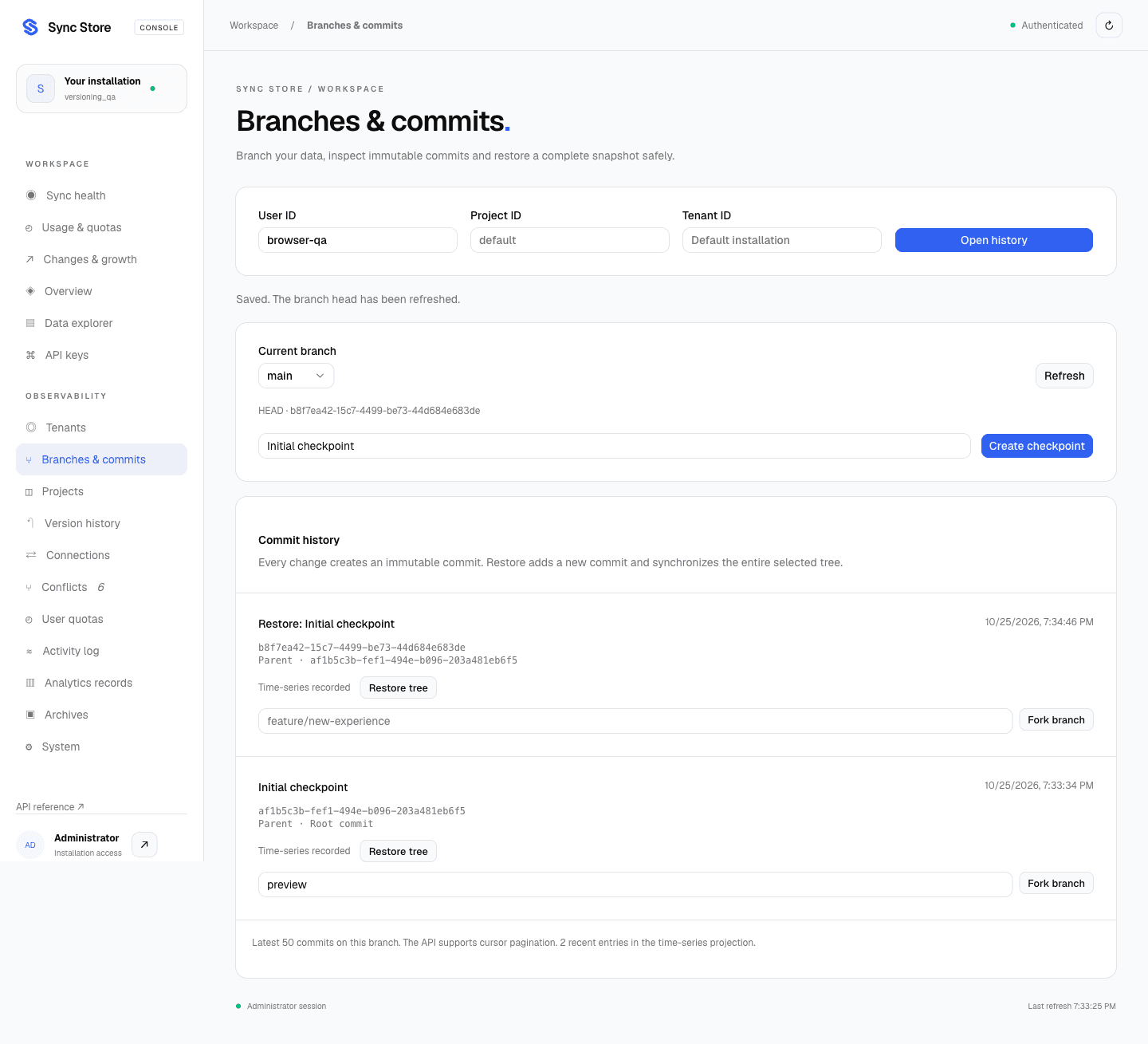
Use the dashboard
Open Branches & commits, enter the external User ID and Project ID
(default if omitted), then choose Open history. Installation administrators can
also select a tenant ID; tenant administrators are bound to their own workspace.
Commit timestamps advance monotonically relative to their parent, even if replica clocks differ. Keep server clocks synchronized for meaningful wall-clock reporting.
Every storage mutation creates a commit automatically. Create a named checkpoint for a meaningful milestone. Each commit shows its parent and creation time. Use Fork branch on a commit to copy its complete tree to a new branch. Branches are scoped to a single tenant, project and user, not shared across all users.
Select a branch to inspect its commits. Restore tree replaces that branch's data with the selected snapshot, deleting keys absent from it. Confirmation is required in the dashboard. Restoration creates a new commit and normal synchronized events; it never rewrites old commits. A concurrent head change returns 409. Refresh and review the new head before trying again.
The list shows the latest 50 commits recorded on the selected branch. A newly forked branch initially points to its source commit; its own list starts with its next write or checkpoint. The parent link remains available through the commit API.
SDK
Version operations require unrestricted project read access; mutations also require write permission. Prefix-restricted credentials cannot inspect whole-tree commits. They can still read and write permitted individual keys.
const main = new RemoteStorage({
  serverUrl: 'https://sync.example.com',
  apiKey: applicationKey,
  userId: 'customer-42',
  namespace: 'production:tenant-a:project-a',
  branch: 'main',
  autoConnect: false,
});

const branches = await main.getBranches();
const head = branches.find(b => b.name === 'main')!.head;
const checkpoint = await main.commit('Before redesign', head, crypto.randomUUID());
await main.createBranch('feature/redesign', checkpoint.id);

const feature = new RemoteStorage({
  serverUrl: 'https://sync.example.com',
  apiKey: applicationKey,
  userId: 'customer-42',
  namespace: 'production:tenant-a:project-a',
  branch: 'feature/redesign',
});
await feature.setItem('settings/theme', 'dark');

const commits = await feature.getCommits();
const older = await feature.getCommits(commits.at(-1)?.id);
const snapshot = await feature.getCommit(checkpoint.id);
const timeline = await feature.getCommitTimeline();
Use a separate client for each branch; do not switch the branch of an active client
with queued offline writes. HTTP uses X-Branch; Socket.IO uses auth.branch.
Omitting the branch selects main. Nonexistent branches are rejected.
For a whole-tree restore, obtain the selected branch's latest head and pass it as
expectedHead. Keep the request ID if a response is lost:
const head = (await feature.getBranches()).find(b => b.name === 'feature/redesign')!.head;
const requestId = crypto.randomUUID(); // retain this for an uncertain retry
await feature.restoreCommit(checkpoint.id, 'Restore baseline', head, requestId);
These management calls run online over HTTP, including when synchronization uses WebSocket. Their results do not imply that an offline peer has already received events.
Durability and time-series storage
Authoritative commits, immutable content blobs, branch heads, storage changes, per-key history, receipts and outbox work share a MongoDB transaction. A failure before commit rolls everything back. Commits use a parent ID and a complete tree manifest referencing content-addressed blobs. The first commit captures the current baseline; history from before this feature cannot be reconstructed.
A worker projects committed metadata to commit_timeline, a native MongoDB
time-series collection. Projection is at least once: a crash after insertion but
before acknowledgement can leave duplicates. The timeline API deduplicates by commit
ID. The dashboard distinguishes pending and recorded projection. Restores always use
the authoritative commit, so projection lag does not block recovery.
MongoDB time-series collections do not support transactional writes or unique indexes; see the MongoDB limitations.
Prisma 8's official @prisma/orm-mongo package handles modeled CRUD, commit reads,
branch queries and cursor filters. The installed RC cannot bind ORM operations to a
shared ClientSession, so atomic storage/version/outbox operations use the official
MongoDB driver. Native time-series DDL/projection and operational collections without
a Prisma contract remain explicit exceptions. Both paths share one connection pool.
Limits
- A serialized tree manifest is limited to 8 MiB, below MongoDB's document limit.
- Forks and restores materialize the whole tree in one transaction. Large trees can reach MongoDB transaction time/resource limits and fail atomically; use smaller user namespaces rather than assuming unlimited snapshot size.
- Commits and blobs have no automatic expiry or garbage collection. The per-key
HISTORY_RETENTION_DAYSsetting does not delete commit snapshots. Plan disk capacity and include all version collections in backups. - Branch merging, rebasing, deletion and Git protocol interoperability are not included.